
Quickstart
Install, run, and configure a local Agent Hub instance.
This page covers installing the hub, running it locally as a binary or through the container and compose file, and connecting the first agent. The REST API, the installable PWA, and the MCP surface all ship; the agent surface and human surface pages describe their contracts, and artifacts covers authoring.
Two things are intended design rather than shipped behaviour. Background push
notifications are deferred: a fully closed installed app raises nothing, and
the hub keeps an in-app notification and a freshness stream instead
(ADR 0016). The one exception is
opt-in: with notify_url set to a target the operator runs, such as a
self-hosted ntfy topic, the hub POSTs a contentless nudge there when something
starts waiting (ADR 0026). The embedded tailnet
endpoint is experimental
(ADR 0014).
Install
Every path needs HUB_ADMIN_TOKEN. The PWA's control surface refuses every
request without one, and the store is created with owner-only permissions, so
set a token of your own rather than the examples here.
The published port carries plain HTTP on every interface of the host, so the token and every response cross the network unencrypted. Read what the published port carries before you publish 8080 that way.
The container image
Pull it from ghcr.io/abn/agent-hub, published under abn. The image is
distroless and runs as a non-root user, so it needs no shell and answers a
healthcheck with the binary's own health subcommand.
podman pull ghcr.io/abn/agent-hub:1.0.0
podman run --detach --name agent-hub \
  --publish 8080:8080 \
  --env HUB_ADMIN_TOKEN=change-me \
  --volume agent-hub-data:/data \
  ghcr.io/abn/agent-hub:1.0.0
docker run takes the same arguments. To add TLS in front, publish to loopback
instead (--publish 127.0.0.1:8080:8080) and set HUB_PUBLIC_URL to the
address callers use.
Build the same image from a checkout instead of pulling it. The image context
carries no .git, so pass the commit in, and the Settings Version row reads
the version and that commit:
podman build -f Containerfile \
  --build-arg GIT_COMMIT="$(git rev-parse --short HEAD)" \
  --tag ghcr.io/abn/agent-hub:1.0.0 .
Under compose the file builds the image, mounts a named volume at /data, keeps
the rest of the filesystem read-only and stops with a grace period above the
hub's drain. It refuses to render without the token in the environment:
HUB_ADMIN_TOKEN=change-me docker compose -f deploy/compose.yaml up --build
That file is covered in run with compose below.
A release binary
A GitHub release carries one archive per platform: Linux on x86_64 and arm64,
statically linked, and macOS on Apple silicon and Intel. Windows is not built.
The archive holds the full binary, server and client in one, with a .sha256
checksum file beside it. Download the one for the host, check it, and unpack
it:
VERSION=v1.2.0
TARGET=aarch64-apple-darwin
NAME="agent-hub-$VERSION-$TARGET"
BASE="https://github.com/abn/agent-hub/releases/download/agent-hub-$VERSION"
curl -fsSLO "$BASE/$NAME.tar.gz"
curl -fsSLO "$BASE/$NAME.sha256"
shasum -a 256 -c "$NAME.sha256"
tar -xzf "$NAME.tar.gz"
"./agent-hub-$VERSION-$TARGET/agent-hub" --help
TARGET is one of x86_64-unknown-linux-musl, aarch64-unknown-linux-musl,
aarch64-apple-darwin or x86_64-apple-darwin. Continue with
run the binary.
From source
A stable Rust toolchain, 1.97 or newer. Continue with build from source and run the binary.
Build from source
The project builds with a recent stable Rust toolchain (1.97 or newer).
make build produces a debug binary:
make build
For a release binary, use the locked build:
cargo build --release --locked
Configure
The binary reads its configuration from config.toml (system
/etc/agent-hub/config.toml layered with user
$XDG_CONFIG_HOME/agent-hub/config.toml, else
~/.config/agent-hub/config.toml, fallback ~/.agent-hub/config.toml, or
named by HUB_CONFIG), overridden by environment variables. The inspect
command (agent-hub config, --path, --check) reports the active settings,
search paths, and validation status.
Key ([hub]) |
Variable | Default | Purpose |
|---|---|---|---|
data_dir |
HUB_DATA_DIR |
./data |
Directory for the hub store, session files, artifact blobs, and the tailnet key state |
bind |
HUB_BIND |
127.0.0.1:8080 |
Socket address the HTTP API binds to; with port 0 the system picks a free port and the startup line names the bound address |
public_url |
HUB_PUBLIC_URL |
unset | External origin the hub is reached at, such as https://hub.example; overrides the address derived from the request |
admin_token |
HUB_ADMIN_TOKEN |
unset | Admin token for the control surface. Required when the bind is not loopback; a loopback hub without one starts but its PWA control surface refuses every request, so set it before opening the app |
active_window_secs |
HUB_ACTIVE_WINDOW_SECS |
900 |
How long after its last tool call a session still counts its owner as an agent at work; 1 to 2592000 seconds |
inbox_action_per_agent |
HUB_INBOX_ACTION_PER_AGENT |
100 |
Open action items one agent may leave waiting in one project; 0 disables the cap |
inbox_action_per_project |
HUB_INBOX_ACTION_PER_PROJECT |
1000 |
Open action items all agents together may leave waiting in one project; 0 disables the cap |
enrol_pending_max |
HUB_ENROL_PENDING_MAX |
20 |
Most pending enrolment requests the hub holds at once, across every source |
enrol_pending_ttl_secs |
HUB_ENROL_PENDING_TTL_SECS |
86400 |
How long a pending enrolment waits before it is treated as abandoned and cleaned up; 1 to 2592000 seconds |
events_per_project |
HUB_EVENTS_PER_PROJECT |
1000000 |
Most events one project may hold; a write past it is refused until durable work is promoted or the feed is pruned; 0 disables the ceiling |
enrol |
HUB_ENROL |
on |
Whether the unauthenticated enrolment endpoint is open; off closes it |
trust_proxy |
HUB_TRUST_PROXY |
unset | Comma-separated peer IP addresses whose forwarded client header the hub trusts, such as 127.0.0.1 when a reverse proxy runs on the same host; unset trusts none |
node_name |
HUB_NODE_NAME |
the host name | Name the human sees for this node; set it when the host name is a generated container id |
tailnet |
HUB_TAILNET |
unset | A Tailscale auth key; enables the optional embedded tailnet endpoint |
tailnet_port |
HUB_TAILNET_PORT |
8080 |
Port to serve on the tailnet address |
tailnet_control_url |
HUB_TAILNET_CONTROL_URL |
unset | Control server URL for a self-hosted control plane; the public one is the default |
notify_url |
HUB_NOTIFY_URL |
unset | An http or https URL the hub POSTs a fixed, contentless sentence to when something starts waiting on the human; unset sends nothing. It may not carry credentials, and only its origin is printed |
notify_token |
HUB_NOTIFY_TOKEN |
unset | Sent to the notify target as Authorization: Bearer; masked wherever the configuration is printed |
notify_interval_secs |
HUB_NOTIFY_INTERVAL_SECS |
60 |
Least time between two notify sends; items inside it become one trailing send; 1 to 86400 seconds |
backup_dir |
HUB_BACKUP_DIR |
unset | Existing directory, outside the data directory, where the serving hub writes an online backup; unset turns online backup off (see Operations) |
Without HUB_PUBLIC_URL the hub reads its own address off each request: the
forwarded scheme and host, then the request host, then the bind. Set it when a
reverse proxy rewrites the host to the upstream address, since the address the
hub then sees is not the one callers use. It takes a bare origin, scheme and
host with an optional port and no path, and a bad value fails startup. The
value is what the artifact frame policy names, what a shared artifact link
carries in its preview tags, and what GET /bootstrap/SKILL.md hands a bootstrapping
agent.
The embedded tailnet endpoint is experimental and is compiled into the default
build. Setting HUB_TAILNET is the acknowledgement that it uses early-days
software; the hub records that on startup, so no extra variable is needed. It
is addressed by tailnet IP and carries plain HTTP inside the tunnel, so it
needs HUB_ADMIN_TOKEN as well. The container image builds with
--no-default-features, so it does not carry the embedded endpoint. Leave
HUB_TAILNET unset for the default deployment: the plain container behind a
reverse proxy.
Run the binary
Point the process at a data directory and a bind address:
HUB_DATA_DIR=./data HUB_BIND=127.0.0.1:8080 HUB_ADMIN_TOKEN=change-me \
  ./target/debug/agent-hub
On start it prints one line naming the bound address, the data directory, and
whether an admin token is configured, so a port 0 bind is readable without
turning on logs. RUST_LOG=info turns on the rest of the tracing output.
The release binary lives at target/release/agent-hub. Check the probes from
another shell:
curl http://127.0.0.1:8080/healthz
curl http://127.0.0.1:8080/readyz
The first answers ok while the process runs. The second asks the engine for
its schema version and answers with it, or a 503 problem when the store does
not reply, which is the one to point a container healthcheck at.
On start the binary creates the data directory and its sessions/, kb/ and
artifacts/ children, then opens hub.db at the top of the data directory.
Back up the whole data directory as one unit.
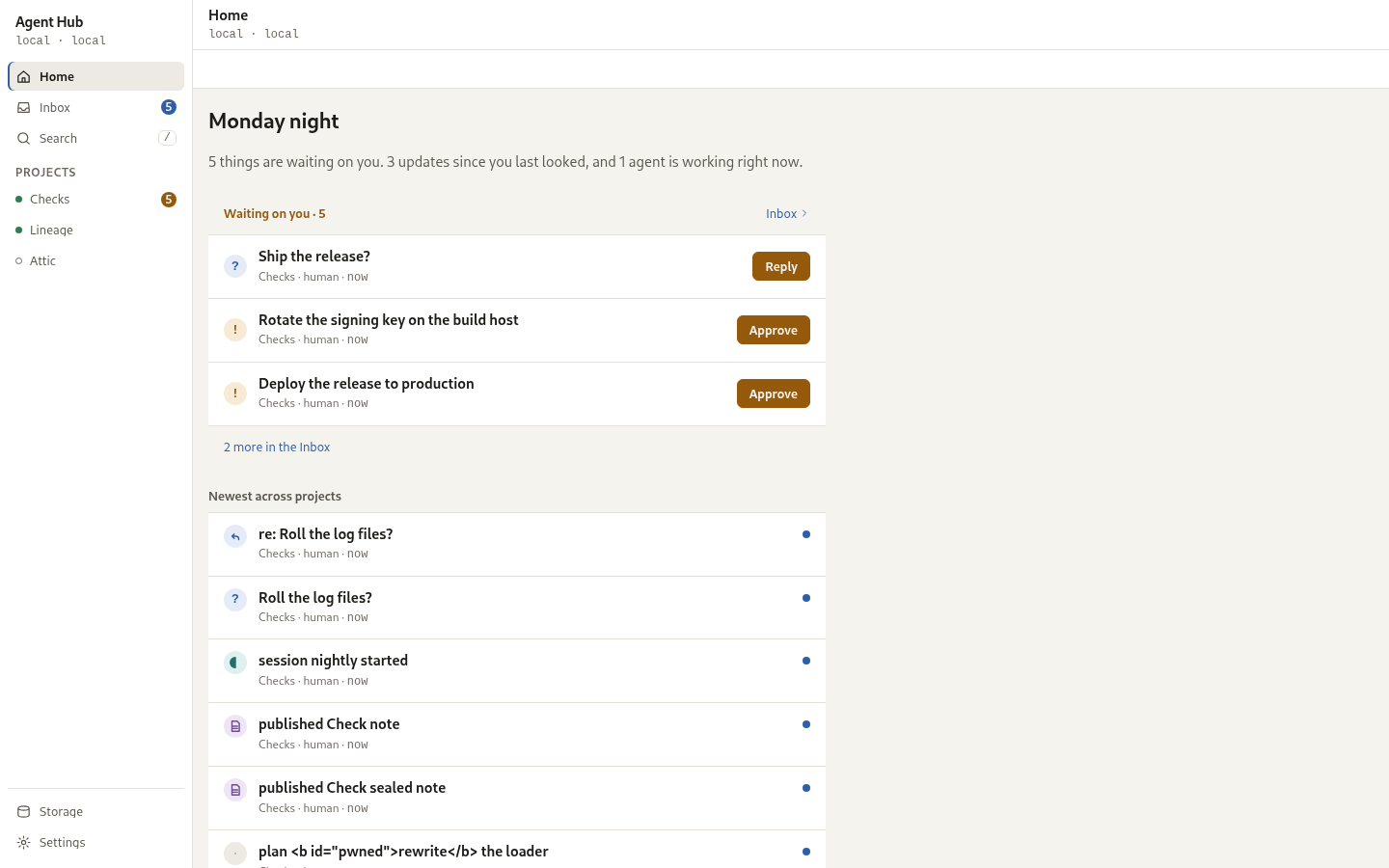
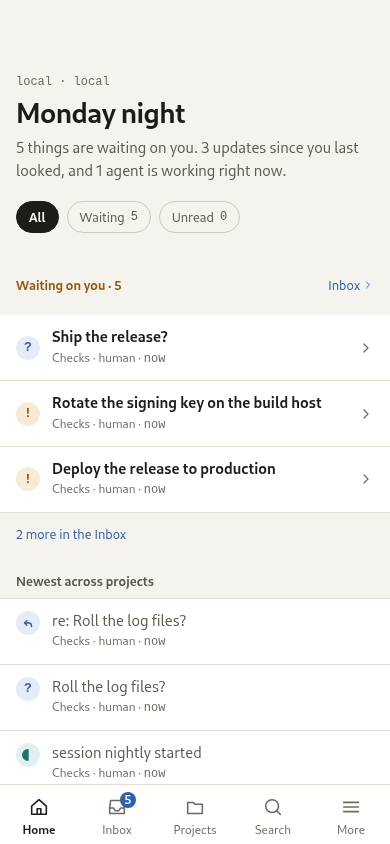
The hub answers at the bind address with the human surface:
Create a project and connect an agent
Every REST call carries the admin token. Create a project, create an agent, and issue its token:
ADMIN="Authorization: Bearer change-me"
curl -sS -X POST http://127.0.0.1:8080/api/v1/projects -H "$ADMIN" \
  -H 'content-type: application/json' \
  -d '{"id":"homelab","display_name":"Homelab"}'
curl -sS -X POST http://127.0.0.1:8080/api/v1/agents -H "$ADMIN" \
  -H 'content-type: application/json' \
  -d '{"id":"my-agent","display_name":"My Agent"}'
curl -sS -X POST http://127.0.0.1:8080/api/v1/agents/my-agent/token -H "$ADMIN"
The token is shown once; reissuing replaces it and revokes the previous one. An agent reaches the hub over MCP with its bearer token:
POST http://127.0.0.1:8080/mcp
Authorization: Bearer <agent token>
Open http://127.0.0.1:8080/ for the human surface and paste the admin token
in Settings. The hub also serves GET /bootstrap/SKILL.md, a bootstrap guide with its
own address filled in, so an agent that can already reach the hub can fetch
the connection details and the tool list. Grants are managed
under Settings or through the agent routes; see the
agent surface.
Reach the hub from a client machine
The same binary is the client. It reads its settings from the environment
first and then from config.toml (~/.config/agent-hub/config.toml or
~/.agent-hub/config.toml, layered over /etc/agent-hub/config.toml);
HUB_CONFIG names another file, a missing file is not an error, and a file
holding a token that others can read warns on stderr and still works.
[client]
url = "http://hub.lan:8080"
token = "..."
agent_id = "my-agent"
project = "homelab"
timeout = 120
Key ([client]) |
Variable | Default | Purpose |
|---|---|---|---|
url |
HUB_URL |
unset | Base URL of a running hub; with none the proxy serves the local data directory standalone |
token |
HUB_TOKEN |
unset | Bearer token the hub resolves to an agent |
agent_id |
HUB_AGENT_ID |
unset | Advisory agent label; the hub derives the actor from the token |
project |
HUB_PROJECT |
unset | Project the knowledge-base shorthands act on when no flag names one |
timeout |
HUB_TIMEOUT |
120 |
Seconds one call may take, handshake to answer; a number above zero, fractional allowed (for example 2.5) |
A harness that speaks only stdio MCP runs the proxy, which forwards every request to the hub over one connection held for the life of the process:
agent-hub mcp
With no HUB_URL configured that command instead serves the local data
directory standalone, as the human admin, and says so on stderr. Standalone
mode opens the data directory itself, so pointing it at a directory a hub is
already serving fails at startup with a hub is already using this directory; set HUB_URL to reach it instead.
A hook has no MCP client, so it calls one tool at a time. The result is JSON on stdout and nothing else; logs and errors go to stderr, and the exit code is 0 for success, 1 for a tool error, 2 for usage, 69 when the hub is unreachable, 77 when the token itself was refused, and 78 when nothing names a hub. A denied project or a missing resource is a tool error (1): the token was accepted, so only an unrecognised token is 77, the code a hook re-enrols on.
agent-hub tools
agent-hub call whoami
agent-hub call feed_read '{"project_id":"homelab","limit":20}'
The project knowledge base has a shorthand, because a session-start hook
reads it on every machine and should not have to quote a JSON object.
agent-hub kb get prints /fs/index.md as markdown, ready to pipe into a
context window; --json prints the tool's result instead, with the version a
conditional write needs. A path outside /fs is taken as relative to it, and
the project comes from --project or from HUB_PROJECT.
agent-hub kb get                            # the index page, as markdown
agent-hub kb get runbooks/deploy.md
agent-hub kb put runbooks/deploy.md --file deploy.md
agent-hub kb put runbooks/deploy.md --if-version "$V" - < deploy.md
agent-hub kb list                           # one page path per line
agent-hub kb delete runbooks/deploy.md
A failed read prints nothing on stdout and says why in its exit code: 1 means
the hub answered that the page is not there, anything else means the hub did
not answer or refused the token. A hook should branch on that rather than end
the line with || true, which would hide a hub that is down.
Each call is its own connection and holds no session, so session_start
in one call is not active in the next. A call reaches a session by naming it:
start it, then read or write that session with the session argument, and
your own agent's session is the one that answers.
agent-hub call session_start \
  '{"project_id":"homelab","session_name":"hook"}'
agent-hub call brain_get \
  '{"path":"/fs/RECOVERY.md","store":"session","session":{"agent":"my-agent","name":"hook","project_id":"homelab"}}'
agent-hub call brain_put \
  '{"path":"/fs/RECOVERY.md","store":"session","content":"what this session is doing","session":{"agent":"my-agent","name":"hook","project_id":"homelab"}}'
A call that names no session is still about the active session, so a one-shot
write needs the argument. There is no session or brain shorthand on the
CLI; the tool name and its JSON are the whole interface. The
full recipe, with the harness block and the migration note, is in
using the hub as a brain.
The client is a default-on client cargo feature. A build with
--no-default-features serves only, which is what the container image needs,
and then agent-hub mcp says it was built without the client.
Run with compose
The compose file builds the image from the Containerfile, mounts a named
volume at /data, and publishes port 8080. It sets HUB_DATA_DIR=/data and
HUB_BIND=0.0.0.0:8080, and restarts the container unless it was stopped by
hand.
docker compose -f deploy/compose.yaml up --build
The container runs as a non-root user and writes only to the mounted volume,
so the rest of the filesystem can be read-only. The compose file refuses to
render without HUB_ADMIN_TOKEN in the environment or a .env file beside it.
Stop the stack with docker compose -f deploy/compose.yaml down; the named
volume keeps the data.
What the published port carries
The compose file publishes 8080 on every interface of the host, and the hub
speaks plain HTTP. The admin token travels in an Authorization header on
every call from the PWA and every admin request, so on that port it crosses
the network unencrypted, as does everything the hub returns. On a trusted
home network that may be the deployment you want; two supported ways to close
it are:
- Put a TLS-terminating reverse proxy in front, publish the container port to
loopback (
"127.0.0.1:8080:8080") or a private network only, and setHUB_PUBLIC_URLto the address the proxy serves. This is the default deployment in ADR 0014. - Reach the hub over a tailnet, either through a Tailscale node on the host or
through the optional embedded endpoint (
HUB_TAILNET), which carries plain HTTP inside the tailnet's own tunnel.
A reverse proxy may also mount the hub on a path instead of a dedicated host
or port, such as https://host/hub/, as long as it strips that path before
forwarding: the hub always serves from its own root and never needs to know a
prefix exists. The PWA itself normalises a request that reaches it without a
trailing slash (/hub) to one that has it (/hub/) before it loads anything
else, since every asset it loads resolves relative to that address. This
needs no configuration; there is no HUB_BASE_PATH or equivalent, and a proxy
that does not strip the prefix is not supported.
See also
- Human interface - the intended human surface
- Architecture overview - components and layout